Build - Contributing
Contributing updates to Building Blocks
The best way to contribute to an already existing Building Blocks register is to fork it on GitHub, apply your own changes to your copy of the register and, when ready, create a Pull Request (PR) so that they can be included in the upstream register.
Typical workflow
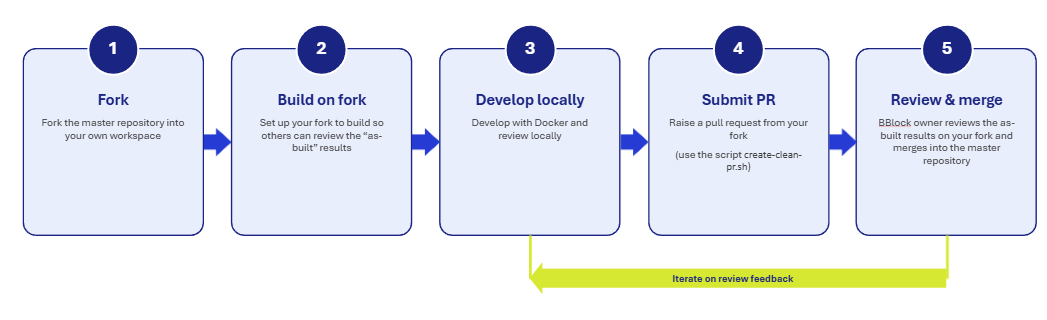
- Fork the repository on GitHub, then enable Actions on it and configure so postprocessing runs on your fork and your “viewer” is enabled on github pages.
- Clone your fork locally and
add the upstream repository as a remote,
conventionally named
fork-parent— this is the default name expected by thecreate-clean-pr.shscript described under Merge conflicts below, though it can be configured to something else. - Make your changes and commit/push them to your fork’s
master/mainbranch as usual. Each push triggers the Building Blocks postprocessing workflows, so you can preview your version of the register on its own GitHub Pages site (and importantly reviewers can access this content). - When ready to submit your changes upstream, run
create-clean-pr.shto produce a PR-ready branch free ofbuild/artifacts, and open the Pull Request using the URL it prints (see Merge conflicts). - Provide a link to the viewer configured on your fork so that reviewers can see the “as-built” version.
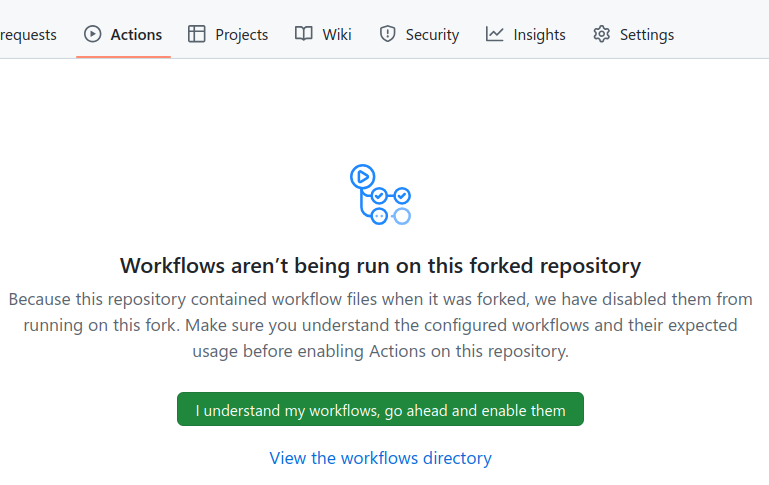
By default GitHub disables Actions workflows on forked repositories, so before step 3 above will do anything, you need to manually enable them on the “Actions” tab of your forked repository.
Avoiding “build” resource merge conflicts
The main downside of working with forks is that the Building Blocks postprocessing workflow generates artifacts
inside the build/ directory of the repository, which can result in
merge conflicts
when the Pull Request is created, making the process more difficult.
To work around this, every register scaffolded from the
Building Blocks template comes with a create-clean-pr.sh
script at its root (alongside build.sh/view.sh) that creates a “clean” branch excluding all changes in the
build/ directory, which can then be used to create the Pull Request from (instead of the master/main one).
If your register predates this script or you’ve deleted it, you can fetch the current version directly:
create-clean-pr.sh
— though note that postprocessing will re-add it automatically on the next run unless it detects it was
deliberately removed from your repo’s own git history.
This is a bash script, so on Windows it needs to be run from Git Bash or WSL — see the Windows setup notes on the Local Build page.
The script is run locally on the directory of the forked register, and it requires that the upstream repository
(i.e., the original Building Blocks register) is
added as a remote.
By default, the fork-parent remote name will be used, but it can be configured to something different (e.g., upstream).
The script will create a new branch with a random name, clean any changes done to the build/ directory and anything in it,
push the branch to your fork of the register, and provide you with a URL to create the Pull Request directly.
It relies on the git-filter-repo Python script, so you must have a working
Python environment for it to work. If git-filter-repo is already installed on your system, the script will use it,
and otherwise will download a copy to a temporary directory (which will be deleted once it is done).
Since the script rewrites history, it requires a clean working tree — commit or stash any pending changes on your
master/main branch before running it.
Updating an existing Pull Request
Each run of create-clean-pr.sh creates a brand new temporary branch (and a new PR URL); it does not update a
previously created one. If you keep committing to your fork’s master/main branch after opening a Pull Request,
re-run the script and either point the existing Pull Request at the newly created branch, or close it and open a
new one from the printed URL. The old temporary branch can then be deleted.
Fork-specific configuration overrides
When working on a fork, you may want to change some settings in bblocks-config.yaml — for example, to use a different
identifier prefix or a different set of imports — without those changes being included in the Pull Request.
You can do this by creating a bblocks-config-override.yml (or .yaml) file at the root of your repository. Any
top-level key present in this file will override the corresponding value from bblocks-config.yaml. For example:
# bblocks-config-override.yml
identifier-prefix: my-fork.
imports:
  - https://www.example.com/overriden-import-1
  - https://www.example.com/overriden-import-2
The create-clean-pr.sh script automatically excludes bblocks-config-override.yml/yaml from the clean PR branch,
so these fork-specific settings will never appear in Pull Requests to the upstream register.
Pitfall: forks and the SPARQL triplestore. If the upstream register configures a sparql endpoint in
bblocks-config.yaml (to publish semantic uplift output to a triplestore), postprocessing on your fork will try to
push to that same endpoint on every run — and fail, since your fork isn’t authorized to write to it. This affects
both the postprocessor’s own push step and the separate “upload to triplestore” workflow job.
Disable it on your fork by setting sparql to false or null in bblocks-config-override.yml:
# bblocks-config-override.yml
sparql: false
Since this file is excluded from clean PR branches (see above), the upstream bblocks-config.yaml — and its real
SPARQL configuration — is left untouched.