Serve and visualize the data
We now have a validated, semantically annotated dataset. In this section we serve it through a custom pygeoapi instance that understands our block's JSON-LD context. The result is an API that not only returns GeoJSON but also exposes a linked data view of each feature — one where every property label is resolved against its vocabulary URI and displayed alongside its definition.
About the custom pygeoapi image
pygeoapi is an open-source Python server that
implements several OGC API standards. Core pygeoapi already supports a
linked-data configuration block for collections, which allows it to inject
a JSON-LD @context into feature responses and declare the item_type of
the collection's features.
The dockerogc/pygeoapi image used in this tutorial is a customized variant
maintained by the OGC that extends this built-in linked-data support with
additional capabilities:
inject_verbatim_context— injects the listed context URLs directly into responses, bypassing pygeoapi's default context handling. This is necessary when serving a custom, externally-defined context such as ours.replace_id_field— replaces a named feature field with the pygeoapi item URL in linked data responses, so that the published URI resolves directly to the API endpoint.fallback_sparql_endpoint— looks up vocabulary URIs in a SPARQL endpoint to retrieve human-readable labels and definitions for display alongside the data in the UI.
Prepare the data
The pygeoapi GeoJSON provider reads from a GeoJSON FeatureCollection file —
a JSON object with "type": "FeatureCollection" containing an array of
features. The sensor.json we created in Section 2 is a single Feature; we
need to wrap it.
Create a new file called sensors.geojson:
{
  "type": "FeatureCollection",
  "features": [
    {
      "type": "Feature",
      "id": "stations/alpha",
      "geometry": {
        "type": "Point",
        "coordinates": [-3.70325, 40.41650]
      },
      "properties": {
        "name": "Station Alpha – Madrid Centro",
        "serialNumber": "AQS-2024-0042",
        "hasObservations": [
          {
            "observedProperty": "https://w3id.org/ad4gd/air-quality/properties/NO2",
            "hasResult": {
              "http://qudt.org/schema/qudt/value": 42.7,
              "http://qudt.org/schema/qudt/hasUnit": { "@id": "http://qudt.org/vocab/unit/MicroGM-PER-M3" }
            },
            "resultTime": "2024-06-01T12:00:00Z"
          },
          {
            "observedProperty": "https://w3id.org/ad4gd/air-quality/properties/pm10",
            "hasResult": {
              "http://qudt.org/schema/qudt/value": 18.3,
              "http://qudt.org/schema/qudt/hasUnit": { "@id": "http://qudt.org/vocab/unit/MicroGM-PER-M3" }
            },
            "resultTime": "2024-06-01T12:00:00Z"
          }
        ]
      }
    }
  ]
}
Set up the directory structure
Create a dedicated working directory for this step with a data/ subdirectory:
pygeoapi-tutorial/
├── pygeoapi.config.yml
└── data/
    └── sensors.geojson
- Linux
- macOS
- Windows
mkdir -p pygeoapi-tutorial/data
cp sensors.geojson pygeoapi-tutorial/data/
cd pygeoapi-tutorial
mkdir -p pygeoapi-tutorial/data
cp sensors.geojson pygeoapi-tutorial/data/
cd pygeoapi-tutorial
mkdir pygeoapi-tutorial\data
Copy-Item sensors.geojson pygeoapi-tutorial\data\
cd pygeoapi-tutorial
Inside this directory, create pygeoapi.config.yml as described below. We
will mount both this file and the data/ directory into the container when
we run it.
Create pygeoapi.config.yml
Create pygeoapi.config.yml with the following content. The standard
pygeoapi server and metadata sections are included for completeness;
the important part for this tutorial is the linked-data block at the end.
server:
bind:
host: 0.0.0.0
# Port 80 is the port pygeoapi listens on *inside* the container.
# We map it to 5000 on the host with -p 5000:80 in the docker run command.
port: 80
# The public URL of this service. pygeoapi uses this to build self-referencing
# links in responses (e.g. the "self" link in a feature, or the item URL used
# by replace_id_field). Must match the address clients will use to reach it.
url: http://localhost:5000
mimetype: application/json; charset=UTF-8
encoding: utf-8
gzip: false
language: en-US
# Allow cross-origin requests so browser clients on other domains can query
# this API directly.
cors: true
pretty_print: true
# Default page size for collection item requests.
limit: 10
map:
url: https://tile.openstreetmap.org/{z}/{x}/{y}.png
attribution: '© <a href="https://osm.org/copyright">OpenStreetMap contributors</a>'
logging:
level: ERROR
metadata:
identification:
title: Air Quality Sensors
description: Semantically enriched air quality monitoring station data
keywords:
- air quality
- sensors
- observations
keywords_type: theme
terms_of_service: https://creativecommons.org/licenses/by/4.0/
url: https://example.com
license:
name: CC-BY 4.0 license
url: https://creativecommons.org/licenses/by/4.0/
provider:
name: My Organization
url: https://example.com
contact:
name: John Doe
email: you@example.com
url: https://example.com
resources:
air-quality-sensors:
type: collection
title: Air Quality Sensor Stations
description: Monitoring stations with air quality observations
keywords:
- air quality
links: []
extents:
spatial:
bbox: [-180, -90, 180, 90]
crs: http://www.opengis.net/def/crs/OGC/1.3/CRS84
providers:
- type: feature
name: GeoJSON
# The data path is inside the container. We mount data/ to /data
# with -v "$(pwd)/data:/data" in the docker run command.
data: /data/sensors.geojson
# The feature field to use as the item identifier in API URLs.
id_field: id
# The feature field displayed as the item title in the UI.
title_field: name
# ------------------------------------------------------------------
# linked-data: a standard pygeoapi configuration block for semantic
# enrichment. dockerogc/pygeoapi extends it with inject_verbatim_context,
# replace_id_field, and fallback_sparql_endpoint (see below).
# ------------------------------------------------------------------
linked-data:
item_type: geo:Feature
# inject_verbatim_context (extension): when true, inserts the @context
# listed below directly into JSON and JSON-LD responses, bypassing
# pygeoapi's default context handling. Required when serving a custom,
# externally-defined context such as ours.
inject_verbatim_context: true
# replace_id_field (extension): the feature field whose value should be
# replaced with the pygeoapi item URL in linked data responses. Using "id"
# here matches the id_field declared in the GeoJSON Feature block,
# so the published URI of each feature points back to this API.
replace_id_field: id
# context: one or more URLs to JSON-LD context documents to inject
# into responses. Use the URL of the context built from your block.
#
# How to find this URL:
# 1. Open your published block register on GitHub Pages.
# 2. Navigate to the Air Quality Sensor Station block.
# 3. Open the "Semantic Uplift" tab.
# 4. Copy the URL of the JSON-LD context file shown there.
#
# It follows this pattern:
# https://{username}.github.io/my-bblocks-register/build/annotated/
# tutorial/sensors/airQualitySensor/context.jsonld
context:
- https://{your-github-username}.github.io/my-bblocks-register/build/annotated/tutorial/sensors/airQualitySensor/context.jsonld
# fallback_sparql_endpoint (extension): a SPARQL query endpoint used by
# the UI to look up the label and description of vocabulary URIs when
# they cannot be resolved directly (e.g. due to CORS restrictions).
# Use an endpoint that serves the vocabularies referenced in your data.
fallback_sparql_endpoint: https://defs-dev.opengis.net/fuseki/sparql
Replace {your-github-username} with your actual GitHub username before
saving. The path in the context URL follows the pattern determined by your
identifier-prefix and block directory name, as noted in Section 1.
Key linked-data settings explained
| Setting | Origin | Purpose |
|---|---|---|
item_type | Core pygeoapi | Declares the RDF type of the collection's features in linked data responses. |
context | Core pygeoapi | A list of JSON-LD context URLs to inject into responses. We point directly to the context built and published by the OGC Blocks postprocessor for our block. |
inject_verbatim_context | dockerogc/pygeoapi extension | Bypasses pygeoapi's default JSON-LD handling and injects the listed context URLs as-is. Set to true whenever you provide a custom external context. |
replace_id_field | dockerogc/pygeoapi extension | Replaces the specified feature field with the pygeoapi item URL in linked data responses, ensuring published URIs resolve to this API. id matches the GeoJSON Feature block's identifier field. |
fallback_sparql_endpoint | dockerogc/pygeoapi extension | A SPARQL endpoint consulted by the UI to resolve labels and descriptions for vocabulary URIs. Should serve the vocabularies used in observedProperty and other URI-valued fields. |
Run the container
From inside the pygeoapi-tutorial/ directory, run:
- Linux
- macOS
- Windows
docker run --rm --pull=always \
  -v "$(pwd)/pygeoapi.config.yml:/pygeoapi/local.config.yml" \
  -v "$(pwd)/data:/data" \
  -p 5000:80 \
  dockerogc/pygeoapi:latest
docker run --rm --pull=always \
  -v "$(pwd)/pygeoapi.config.yml:/pygeoapi/local.config.yml" \
  -v "$(pwd)/data:/data" \
  -p 5000:80 \
  dockerogc/pygeoapi:latest
docker run --rm --pull=always `
  -v "${PWD}/pygeoapi.config.yml:/pygeoapi/local.config.yml" `
  -v "${PWD}/data:/data" `
  -p 5000:80 `
  dockerogc/pygeoapi:latest
The -v flags mount:
- your
pygeoapi.config.ymlover the container's default config path - your
data/directory at/data, which matches thedata: /data/sensors.geojsonpath in the config
--rm removes the container automatically when it exits, so no persistent
container state is created.
Once the container starts, you should see log output ending with something like:
Serving on http://0.0.0.0:80
The service is now available at http://localhost:5000.
Browse the service
The landing page
Open http://localhost:5000. You will see the pygeoapi landing page with links to the available collections and the API definition.
The collection
Navigate to http://localhost:5000/collections/air-quality-sensors. This shows the collection metadata, including spatial extent and links to the items endpoint.
A feature
Navigate to the items endpoint: http://localhost:5000/collections/air-quality-sensors/items
You will see the Station Alpha feature returned as a GeoJSON FeatureCollection.
Click through to the individual item:
http://localhost:5000/collections/air-quality-sensors/items/stations%2Falpha
The custom image unifies the JSON and JSON-LD representations: every response
for this feature already includes an injected @context array pointing at our
block's published context file, regardless of how it is requested:
{
  "@context": [
    "https://{your-github-username}.github.io/my-bblocks-register/build/annotated/tutorial/sensors/airQualitySensor/context.jsonld"
  ],
  "type": "Feature",
  "id": "http://localhost:5000/collections/air-quality-sensors/items/stations%2Falpha",
  "geometry": { ... },
  "properties": {
    "name": "Station Alpha – Madrid Centro",
    "serialNumber": "AQS-2024-0042",
    "hasObservations": [ ... ]
  }
}
Notice that id has been replaced with the full pygeoapi URL — the feature's
URI now resolves directly to this API endpoint. Any linked data client following
this URI will land on a machine-readable description of the resource.
Semantic property enrichment
Beyond the raw data, the custom pygeoapi image renders each feature page with resolved property labels and descriptions. For every field that maps to a URI in the JSON-LD context, the UI attempts to retrieve its label and description in two steps:
- Direct URI resolution — the browser fetches the property URI directly. If the vocabulary server returns a usable response, the label and description are extracted from it.
- SPARQL fallback — if direct resolution fails (most commonly because the
vocabulary server does not send CORS headers, which prevents browser-side
requests), the UI queries the OGC development SPARQL endpoint configured in
fallback_sparql_endpoint(https://defs-dev.opengis.net/fuseki/sparql). For properties known to that endpoint — such as SOSA terms likesosa:resultTimeor other standard OGC vocabulary terms — the label is displayed alongside the value, and hovering reveals the full description.
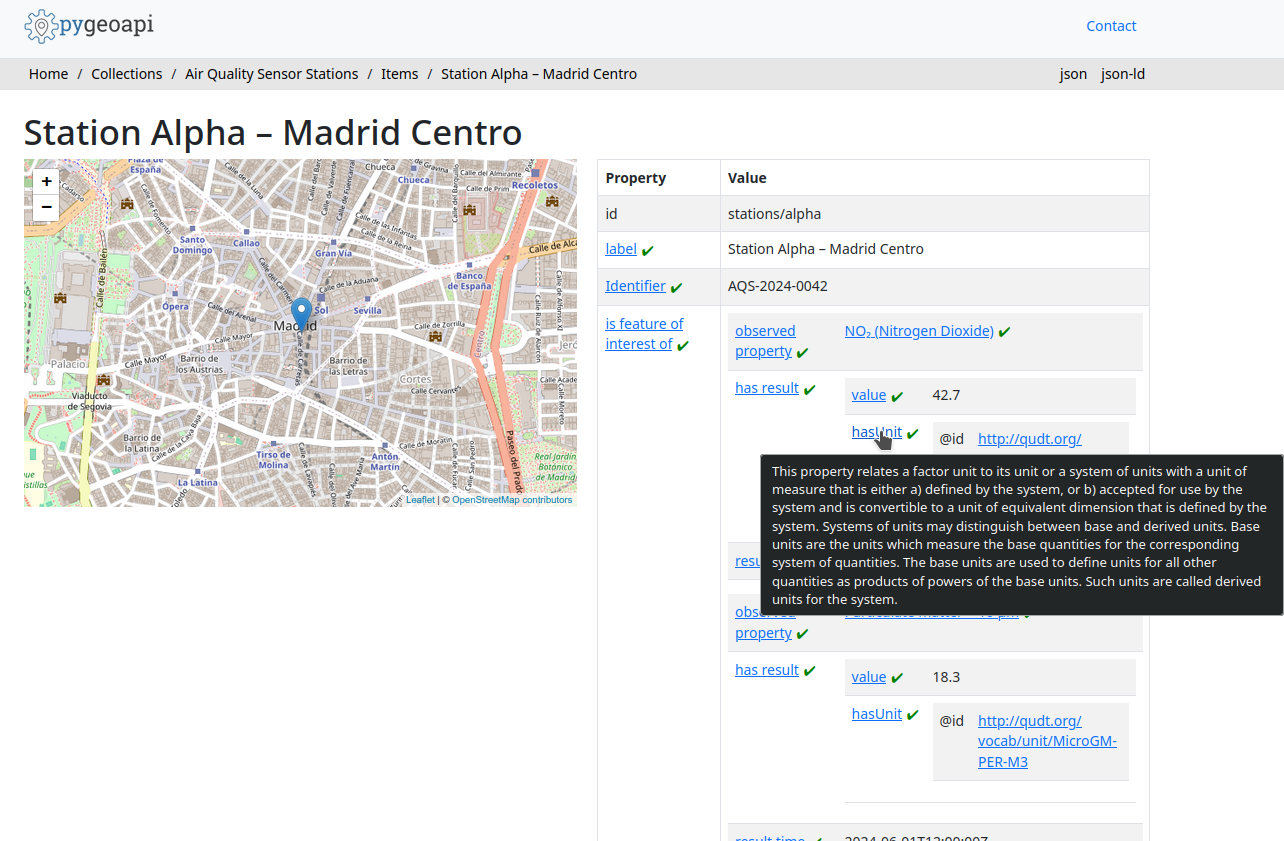
This is the direct payoff of the JSON-LD context in our block: because every field maps to a URI, the system knows what each value means and can retrieve authoritative documentation for it automatically — without any domain-specific display logic.
Epilogue: linked data in the real world
This tutorial has used a placeholder base URI (https://example.com/sensors/)
and a local deployment. Before taking this
pattern into production, there are a few practical considerations worth keeping
in mind.
DNS resolution and live testing
Linked data URIs only deliver their full value when they are dereferenceable —
that is, when an HTTP client can follow them to retrieve a description of the
resource. During local testing, URIs point to localhost addresses that are
invisible to external clients. This is expected for development, but means you
cannot share links and expect them to work until the service is deployed at a
public address.
There is a subtler problem too: even when testing locally yourself, the URIs
embedded in your data will be resolved against the production namespace you
have chosen — for example https://data.myorg.example/sensors/stations/alpha.
If that address is not yet live, any tool that tries to follow those URIs (a
linked data browser, a SPARQL crawler, a validator checking dereferenceability)
will receive a 404, regardless of whether your local container is running
perfectly.
One common strategy for previewing the full resolution cycle before going live
is to use a local HTTP proxy (such as mitmproxy
or a custom nginx rule) that intercepts requests to your production domain and
redirects them to localhost. This lets you test the complete lifecycle —
including URI dereferencing, content negotiation, and linked data browser
rendering — without exposing anything publicly. The trade-off is that the proxy
must be configured on every machine involved in the test.
Testing the full linked data lifecycle (publish a URI → resolve it → retrieve RDF → follow further links) in a fully representative way therefore requires either a publicly accessible deployment or a deliberately configured proxy environment. Reserve the former for when the data model is stable and you are ready to commit to a URI namespace.
Persistent, resolvable identifiers
The URIs you mint for your resources and vocabulary terms should be:
- Persistent: once published, they should not change. URIs that disappear break every system that has stored a reference to them.
- Dereferenceable: following the URI should return a useful description of the resource, either as HTML for a human or as RDF for a machine (ideally both, via content negotiation).
Two common approaches:
Use a domain you control. If your organization owns a suitable domain, dedicate
a path to your definitions (e.g. https://data.myorg.example/sensors/). Configure
your API at that address and use that base URI for all published resources. URIs
will resolve directly to your service.
Use a persistent URI service. w3id.org provides stable,
community-governed URI namespaces that redirect to a URL of your choice. This is
particularly useful when you do not control a suitable domain, or when you want
the URI to remain stable even if the underlying service moves: you register a
namespace (e.g. https://w3id.org/my-org/sensors/), configure it to redirect
to your deployment, and use that namespace as the base URI for all resources.
If you later move the service to a new host, only the w3id.org redirect needs
updating — the URIs themselves remain unchanged.
In both cases, the only things that change from what we have built in this
tutorial are the base_uri passed to uplift_json and the url in
pygeoapi.config.yml. The block definition, the data structure, and the rest of
the workflow remain exactly the same.
Summary
You have now completed the full Applied OGC Blocks workflow:
- Defined a reusable OGC Block that captures the structure and semantics of air quality sensor stations, building on standard GeoJSON Feature and SOSA Observation blocks.
- Published the block to a GitHub Pages register that anyone can import, reference, or extend.
- Validated a conformant data document against the block's schema and inspected its uplifted RDF representation.
- Served the data through a semantics-aware API that injects the block's JSON-LD context into every response and resolves vocabulary URIs to human-readable labels.
The block you created is a publishable, reusable artifact. Partners who import your register can validate their own data against your schema, inherit your semantic annotations in their own blocks, or simply reference your vocabulary mappings to align their own data to the same standard concepts — without any manual mapping effort on either side.