Define your OGC Block
In this section we create an OGC Block for air quality sensor stations from scratch. We will produce a complete block package — schema, semantic annotations, and documentation — build it locally to verify everything is correct, and publish it via GitHub Pages so it can be referenced by anyone.
Create a repository from the template
The OGC maintains a
bblock-template repository
on GitHub that contains the scaffolding for a new block register. Using it as a
template (rather than forking it) creates a fresh, independent repository with its
own history, and importantly, it ensures that GitHub Actions workflows are enabled
from the start.
- Navigate to github.com/opengeospatial/bblock-template.
- Click Use this template → Create a new repository.
- Name the new repository
my-bblocks-register. Leave the visibility as Public — GitHub Pages (which we will use for publishing) requires a public repository on free GitHub accounts. - Click Create repository.
Once GitHub has created the repository, clone it locally:
git clone https://github.com/{your-github-username}/my-bblocks-register.git
cd my-bblocks-register
Enable GitHub Pages
Before making any changes, configure the repository to publish its block register automatically after every push. In the repository settings on GitHub:
- Go to Settings → Pages.
- Under Build and deployment, set Source to GitHub Actions.
That is all — the workflow file is already included in the template. Every push to the default branch will trigger a build that validates the blocks, generates all derived artifacts, and publishes them to GitHub Pages.
Configure bblocks-config.yaml
Open bblocks-config.yaml in the root of the repository. This file controls the
identity and dependencies of your block register. Replace its contents with the
following:
name: Air Quality Sensor Blocks

# The identifier prefix is prepended to the path of every block in _sources/
# to form its globally unique ID. The first component should represent your
# organization; subsequent components describe the collection.
identifier-prefix: r1.tutorial.sensors.

imports:
  # The main OGC Blocks register (GeoJSON Feature, etc.)
  - default
  # The SOSA/SSN Observations register, which we will reference in our schema
  - https://opengeospatial.github.io/ogcapi-sosa/build/register.json
identifier-prefix determines the identifier of every block in this
repository. A block stored at _sources/airQualitySensor/ will receive the
identifier r1.tutorial.sensors.airQualitySensor. Identifiers should be as
stable as possible — changing them later breaks any external references to the
block.
For this tutorial we use r1.tutorial.sensors.. For a production register,
replace the first component with an identifier for your organization (e.g. your
GitHub username, your organization's abbreviation, or an OGC-issued prefix) and
the remaining components with something that describes the collection.
imports lists other block registers whose blocks this register can reference
by ID. By listing the SOSA register here, we will be able to use
bblocks://ogc.sosa.properties.observation in our schema without having to copy
any of its files, and its JSON-LD context and validation rules will be inherited
automatically.
Remove the example blocks
The template ships with two example blocks — myFeature and mySchema — to
illustrate the expected structure. Delete them before creating ours:
- Linux
- macOS
- Windows
rm -rf _sources/myFeature _sources/mySchema
rm -rf _sources/myFeature _sources/mySchema
Remove-Item -Recurse -Force _sources\myFeature, _sources\mySchema
Create the block directory
Our block will live at _sources/airQualitySensor/. Create it:
- Linux
- macOS
- Windows
mkdir _sources/airQualitySensor
mkdir _sources/airQualitySensor
mkdir _sources\airQualitySensor
_sources/The _sources/ directory is not an arbitrary name. It is the designated location
for the human-authored source files of an OGC Block register — the schemas,
contexts, metadata, and documentation that you write and maintain. When the
postprocessor runs (either locally via Docker or automatically via GitHub Actions),
it reads everything under _sources/, validates it, resolves all bblocks://
references, composes inherited contexts, and writes the finished, ready-to-consume
artifacts into a separate build/ directory. The build/ directory is generated
output and should never be edited by hand. _sources/ is the source of truth.
The path of this directory, relative to _sources/, contributes to the block's
identifier: combined with the prefix above, the full ID becomes
r1.tutorial.sensors.airQualitySensor.
Block files
An OGC Block is defined by a small set of files inside its directory. We will
create four: bblock.json, description.md, schema.yaml, and context.jsonld.
bblock.json — metadata
bblock.json holds the block's metadata: name, version, status, and other
descriptive properties. Create _sources/airQualitySensor/bblock.json:
{
  "name": "Air Quality Sensor Station",
  "abstract": "A GeoJSON Feature describing a fixed air quality monitoring station, including SOSA observations of atmospheric properties.",
  "status": "under-development",
  "dateTimeAddition": "2024-01-01T00:00:00Z",
  "itemClass": "schema",
  "version": "0.1",
  "dateOfLastChange": "2024-01-01",
  "scope": "unstable",
  "isProfileOf": [
    "ogc.geo.features.feature"
  ],
  "tags": [
    "air-quality",
    "sensors",
    "observations",
    "sosa"
  ]
}
A few things worth noting:
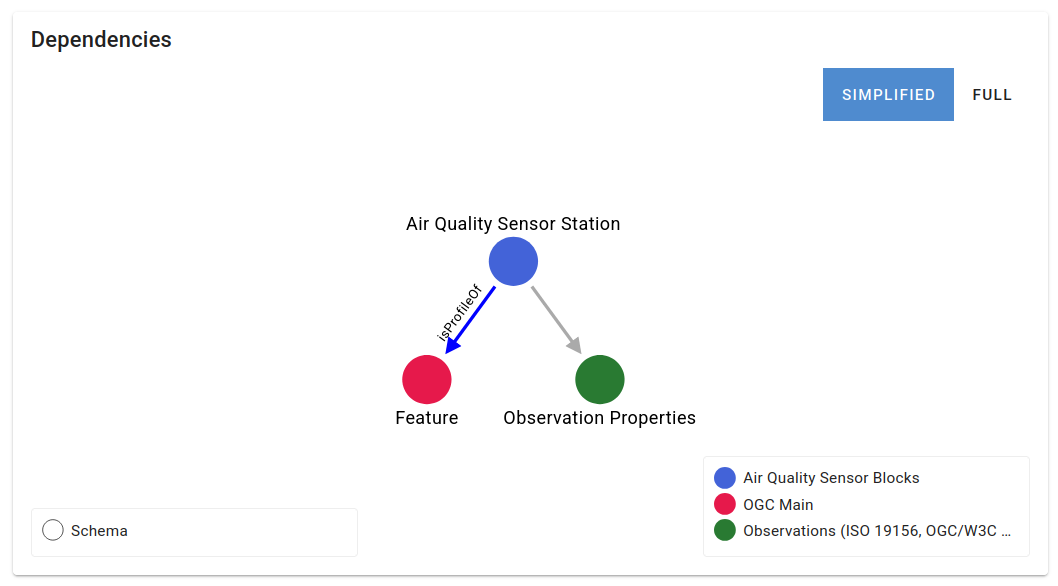
itemClass: "schema"declares this block as a JSON Schema type. Blocks can also be RDF-only definitions, API parameter definitions, and other types, but schemas with semantic annotations are the most common.itemIdentifieris absent intentionally — it is generated automatically from theidentifier-prefixinbblocks-config.yamlcombined with the directory path.status: "under-development"is appropriate for a new block that has not yet been reviewed or formally adopted.isProfileOfdeclares which blocks this block specializes. Listingogc.geo.features.featurehere makes the inheritance relationship explicit and machine-readable: the postprocessor records it in the published register, and the viewer displays it as a navigable dependency graph.
description.md — documentation
Create _sources/airQualitySensor/description.md with a short description of
what the block represents:
# Air Quality Sensor Station

An OGC Block describing a fixed air quality monitoring station as a GeoJSON Feature.

The feature's `properties` include basic station metadata and a `hasObservations`
array of SOSA Observation objects, each capturing a measurement of an atmospheric
property (such as NO₂ concentration or PM10 levels) at a specific point in time.

Semantic annotations are provided for all locally defined properties. Properties
inherited from the base GeoJSON Feature and SOSA Observation blocks carry their
own annotations and do not need to be re-declared.
schema.yaml — the JSON Schema
The schema defines the allowed structure of a conformant document. Create
_sources/airQualitySensor/schema.yaml:
$schema: https://json-schema.org/draft/2020-12/schema
description: An air quality monitoring sensor station as a GeoJSON Feature

allOf:
  # Inherit the full GeoJSON Feature structure and its semantic annotations
  - $ref: bblocks://ogc.geo.features.feature
  # Add our own properties on top
  - properties:
      # "properties" here refers to the GeoJSON Feature's "properties" object
      properties:
        type: object
        properties:
          name:
            type: string
            description: Human-readable name of the sensor station
          serialNumber:
            type: string
            description: Manufacturer-assigned serial number of the sensor unit
          hasObservations:
            type: array
            description: Air quality observations recorded at this station
            items:
              # Each observation must conform to the SOSA Observation block.
              # Its schema, validation rules, and JSON-LD context are all
              # inherited automatically from the imported register.
              $ref: bblocks://ogc.sosa.properties.observation
        required:
          - name
Let's walk through the key parts:
$ref: bblocks://ogc.geo.features.feature uses the bblocks:// URI scheme
to reference another block by its identifier. The postprocessor resolves this to
the published schema URL of the GeoJSON Feature block, and also pulls in its
JSON-LD context and any SHACL validation shapes — so our block inherits all of
that for free. Our document must still be a valid GeoJSON Feature, with type,
geometry, and properties fields.
The nested properties structure reflects GeoJSON's own nesting: the outer
properties keyword is JSON Schema's property constraint mechanism, while the
inner properties is the GeoJSON Feature's own data container. Our custom fields
(name, serialNumber, hasObservations) live inside that data container.
Yes, there really are three levels of properties here, and yes, it is
confusing the first time — much like saying it three times too many. To keep
them straight:
| Level | What it is |
|---|---|
allOf[1].properties | JSON Schema keyword: declares constraints on the properties of the JSON object being validated (the Feature itself) |
allOf[1].properties.properties | The GeoJSON properties field: the key that holds all domain-specific data inside a Feature |
allOf[1].properties.properties.properties | JSON Schema keyword again: declares constraints on the fields inside the GeoJSON properties object — i.e., our actual sensor fields |
The innermost properties block is where your domain data lives. Everything
above it is structural boilerplate required by the combination of JSON Schema
and GeoJSON.
$ref: bblocks://ogc.sosa.properties.observation does the same for each
item in the hasObservations array: it inherits the SOSA Observation schema,
context, and validation rules. A conformant observation must include at least one
of hasResult or hasSimpleResult.
context.jsonld — semantic annotations
The JSON-LD context maps the property names in our schema to globally unique URIs. This is what turns ordinary JSON into linked data.
An important detail: only the fields we define ourselves need entries in this
context. The fields inherited from bblocks://ogc.geo.features.feature (such
as type, geometry, id) carry their own context from the GeoJSON Feature
block; fields inside each observation object carry their context from the SOSA
Observation block. The postprocessor composes all these inherited contexts
automatically.
Create _sources/airQualitySensor/context.jsonld:
{
  "@context": {
    "name": "http://www.w3.org/2000/01/rdf-schema#label",
    "serialNumber": "http://purl.org/dc/terms/identifier",
    "hasObservations": "http://www.w3.org/ns/sosa/isFeatureOfInterestOf"
  }
}
name → rdfs:label is a natural fit: rdfs:label is the standard
RDF Schema property for a human-readable
name of a resource.
serialNumber → dcterms:identifier uses the
Dublin Core Terms
identifier predicate. The serial number uniquely identifies the physical sensor
unit, which maps well to the concept of an identifier for a resource.
hasObservations → sosa:isFeatureOfInterestOf requires a brief explanation.
In the SOSA/SSN ontology, a
FeatureOfInterest is the thing that an Observation is about.
sosa:isFeatureOfInterestOf is the inverse of sosa:hasFeatureOfInterest — it
links a Feature of Interest to the observations that are about it. By mapping
hasObservations to this property, we are declaring that the sensor station is
the feature of interest in each of its observations: the observations describe
conditions at or of this station.
For brevity, this tutorial maps only the three locally defined properties and uses well-established, widely supported vocabularies (RDF Schema, Dublin Core Terms, SOSA/SSN). In a production block, you would consult domain-specific vocabularies (such as INSPIRE, QUDT, or CF Conventions for environmental data) and choose URIs for your properties from whichever authoritative source best captures their meaning.
Build and preview locally
Before publishing anything to GitHub, build the register locally to verify that the schema, context, and configuration are all correct.
Run the postprocessor from the root of the repository. It will pull the Docker image on the first run:
- Linux
- macOS
- Windows
docker run --pull=always --rm --workdir /workspace \
  -v "$(pwd):/workspace" \
  ghcr.io/opengeospatial/bblocks-postprocess \
  --clean true --base-url http://localhost:9090/register/
docker run --pull=always --rm --workdir /workspace \
  -v "$(pwd):/workspace" \
  ghcr.io/opengeospatial/bblocks-postprocess \
  --clean true --base-url http://localhost:9090/register/
docker run --pull=always --rm --workdir /workspace `
  -v "${PWD}:/workspace" `
  ghcr.io/opengeospatial/bblocks-postprocess `
  --clean true --base-url http://localhost:9090/register/
The --base-url flag sets the public URL that will be embedded in the generated
artifacts. We set it to http://localhost:9090/register/ so that the output is
compatible with the local viewer we will run next. The --clean true flag removes
any previous local build output before starting.
The postprocessor will log progress to the console. Look for output like:
Processing building block: r1.tutorial.sensors.airQualitySensor
  ...generating schema...
  ...generating JSON-LD context...
  ...no examples found (skipping validation)...
Building register...
Done.
If the postprocessor exits with an error, check the log output for the cause.
Common issues include JSON syntax errors in bblock.json or context.jsonld,
and YAML syntax errors in schema.yaml.
The postprocessor writes its output to a build-local/ directory inside the
repository. This directory is listed in .gitignore and is not committed to
git — it is for local preview only. The authoritative build/ directory is
generated by the GitHub Actions workflow when you push.
Now start the local viewer:
- Linux
- macOS
- Windows
docker run --rm --pull=always \
  -v "$(pwd):/register" \
  -p 9090:9090 \
  ghcr.io/ogcincubator/bblocks-viewer
docker run --rm --pull=always \
  -v "$(pwd):/register" \
  -p 9090:9090 \
  ghcr.io/ogcincubator/bblocks-viewer
docker run --rm --pull=always `
  -v "${PWD}:/register" `
  -p 9090:9090 `
  ghcr.io/ogcincubator/bblocks-viewer
Open http://localhost:9090 in your browser. You should see
the block register with the Air Quality Sensor Station block listed.
Click on the block to open its detail page. Explore the tabs:
- JSON Schema — shows the fully resolved, annotated schema for the block (including all inherited content from GeoJSON Feature and SOSA Observation).
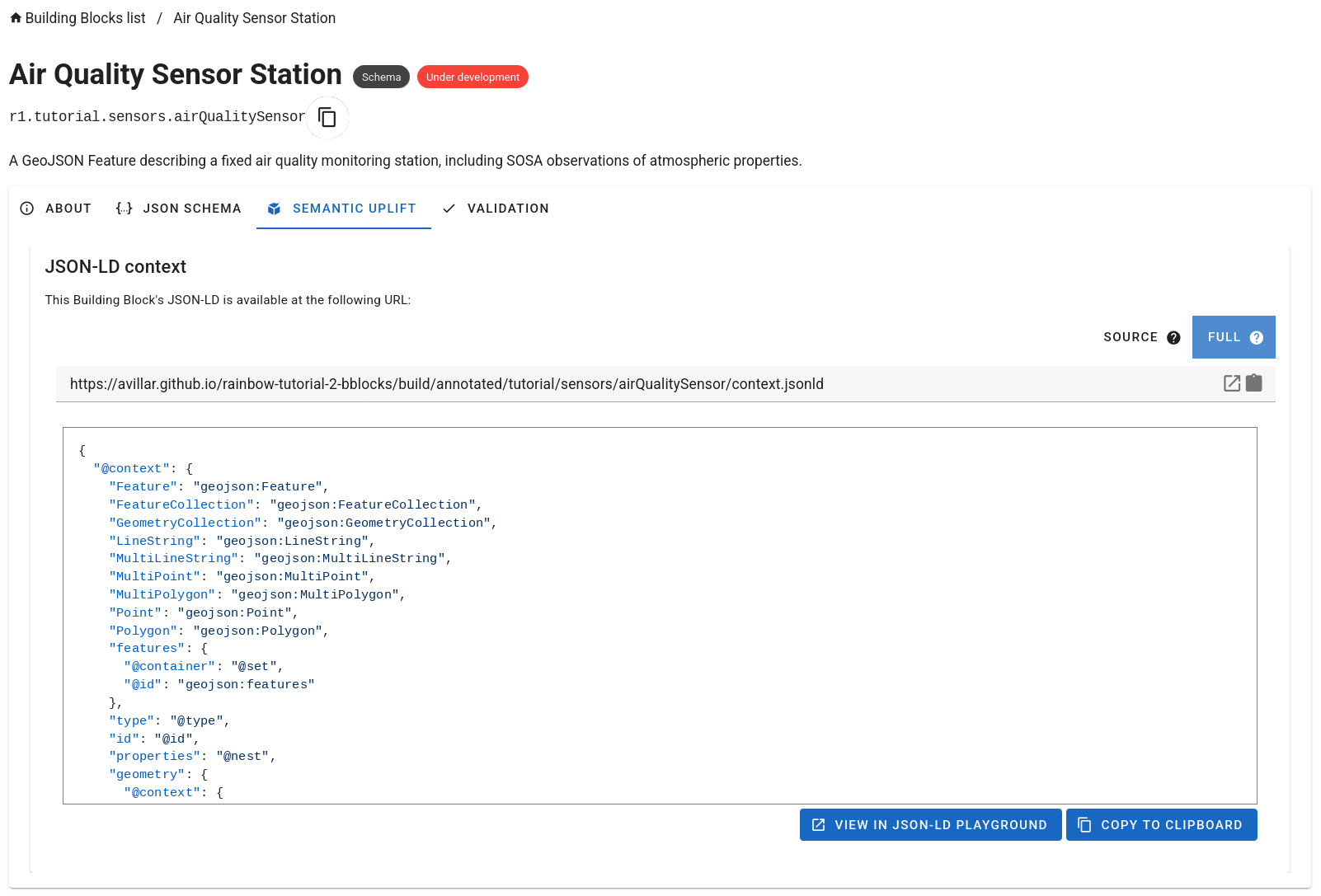
- Semantic Uplift — lists the JSON-LD context that will be applied when
uplifting a conformant document. Locate the URL of the context file in this
tab and note it down — you will need it when configuring pygeoapi in
Section 3. It will look like:
http://localhost:9090/register/build-local/annotated/tutorial/sensors/airQualitySensor/context.jsonld - Dependencies — shows the blocks that this block profiles or imports,
derived from
isProfileOfand theimportsinbblocks-config.yaml. The graph showsairQualitySensordepending on the OGC GeoJSON Feature block, which in turn depends on further standard blocks.
Once you are satisfied with the output, stop the viewer with Ctrl+C and the postprocessor container will already have exited.
Commit and push
Stage the new and modified files and commit:
git add bblocks-config.yaml _sources/
git commit -m "Add air quality sensor station block"
git push
Verify the GitHub Actions workflow
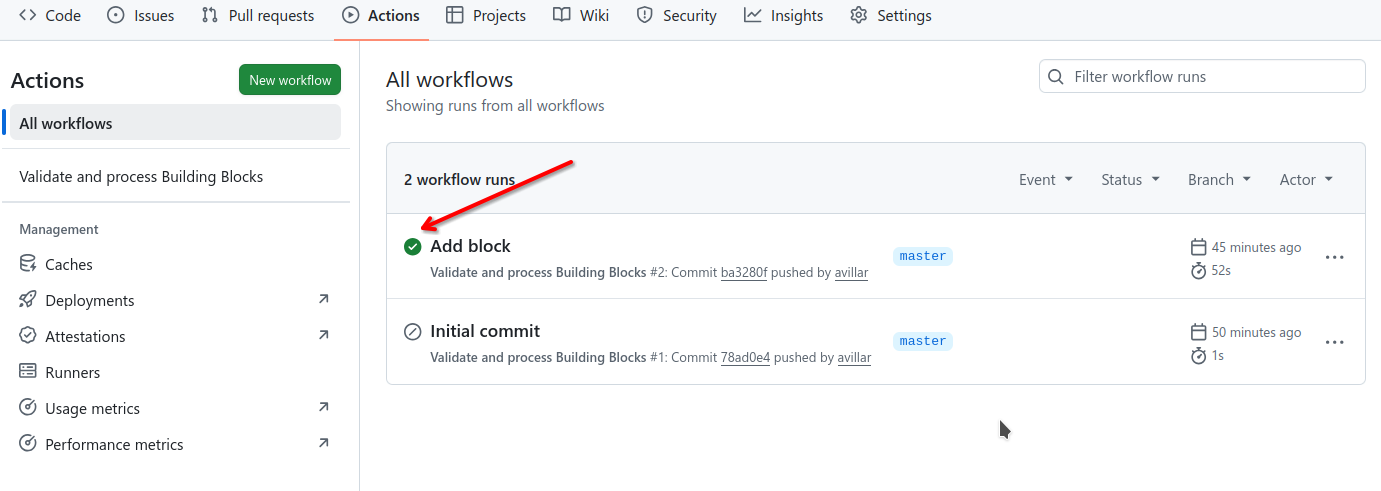
Navigate to your repository on GitHub and open the Actions tab. You should see a workflow run in progress (or recently completed) named something like Validate and postprocess. Click on it to watch the log output.
A successful run will end with all steps showing green check marks. The workflow:
- Runs the same
bblocks-postprocesstool against the published base URL (derived from your GitHub Pages URL). - Commits the generated
build/artifacts back to the repository. - Publishes the
build/directory to GitHub Pages.
If the run fails, the log output will pinpoint the cause.
Browse the published block
After the workflow completes (usually one to two minutes), your block register is live. GitHub Pages publishes it at:
https://{your-github-username}.github.io/my-bblocks-register/
Browse to that URL to see the OGC Blocks viewer rendered from the published
register. The Air Quality Sensor Station block should appear, with the same
tabs you explored locally. Open the Semantic Uplift tab (see screenshot
above) and note the URL of the published JSON-LD context file. It will follow
this pattern:
https://{your-github-username}.github.io/my-bblocks-register/build/annotated/tutorial/sensors/airQualitySensor/context.jsonld
You will use this URL in Section 3. The block is now publicly referenceable: anyone can import your register and extend or validate against your block.
Summary
You now have a published OGC Block that:
- Defines the structure of an air quality sensor station as a GeoJSON Feature
- Embeds SOSA observations as a first-class part of the feature's properties
- Annotates every field with a URI from a standard vocabulary
- Inherits schema, context, and validation rules from the GeoJSON Feature and SOSA Observation blocks